
The Role of .NET MAUI in Cross Platform Development
Building native applications for multiple platforms has historically required a fragmented approach. You often had to manage separate codebases, navigate distinct UI paradigms, and juggle different languages Swift for iOS, Kotlin for Android, and perhaps C# or C++ for Windows. This fragmentation leads to increased development time, higher maintenance costs, and a higher potential for bugs.
For developers seeking efficiency and performance, the introduction of .NET MAUI (Multi-platform App UI) represents a significant shift in cross platform development. As the evolution of Xamarin.Forms, .NET MAUI unifies mobile and desktop development into a single framework.
In this article, we will analyze the architecture of .NET MAUI, explore how it improves legacy frameworks, and discuss why it is a critical tool for scaling your application development.
What is .NET MAUI?
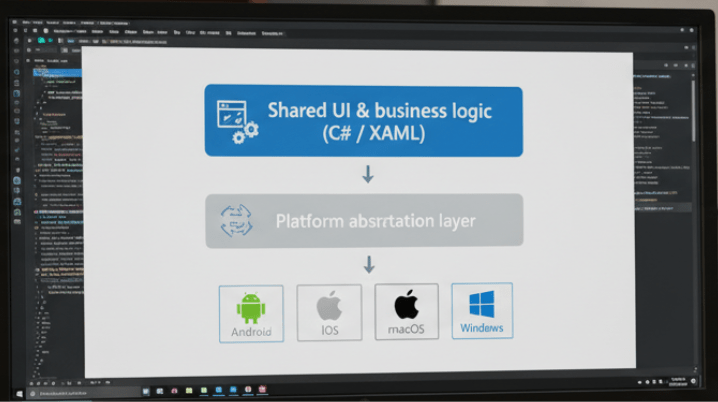
.NET MAUI is a cross-platform framework for creating native mobile and desktop apps with C# and XAML. It allows developers to build apps that can run on Android, iOS, macOS, and Windows from a single shared codebase.
While its predecessor, Xamarin.Forms, focused primarily on mobile, .NET MAUI expands that scope to include desktop scenarios, acknowledging the growing need for applications that transition seamlessly between mobile devices and workstations.
The core promise of this framework is simple: write your UI and business logic once and deploy it everywhere. However, the value extends beyond just code sharing; it lies in the architectural improvements that enhance performance and developer productivity.
Architectural Evolution: Handlers vs. Renderers
For technical leads and developers assessing the viability of a framework, performance is usually the deciding factor. The most significant technical upgrade in .NET MAUI compared to Xamarin.Forms is the shift from “Renderers” to “Handlers.”
The Legacy Approach: Renderers
In Xamarin.Forms, every cross-platform control was backed by a “Renderer” on the native platform. These renderers were tightly coupled to the Xamarin.Forms elements. This architecture, while functional, relied heavily on assembly scanning and reflection, which often resulted in slower startup times and increased memory usage.
The Modern Approach: Handlers
.NET MAUI introduces the Handler architecture. Handlers are designed to be decoupled from cross-platform controls. They communicate through an interface rather than direct binding.
This change offers several distinct advantages:
- Improved Performance: By removing the tight coupling and reducing the reliance on reflection, the framework can render UI elements faster.
- Better Tree Shaking: The decoupling allows the .NET linker to more effectively remove unused code, resulting in smaller application package sizes.
- Easier Customization: Accessing the native underlying control is straightforward, allowing developers to tweak platform specific properties without writing a full custom renderer.
The Power of the Single Project
One of the major friction points in cross-platform development is project management. Traditionally, you would manage a solution containing a shared project and separate “head” projects for each platform (Android, iOS, etc.). This requires managing resources (images, fonts, splash screens) separately for each target.
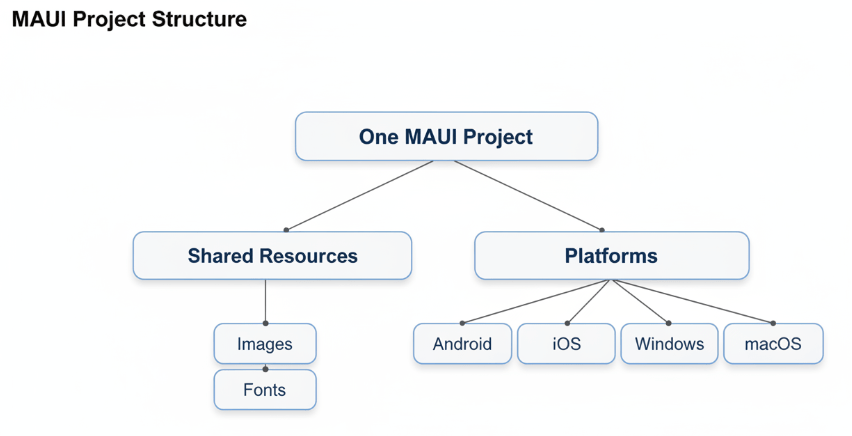
.NET MAUI implements a “Single Project” system. This structure consolidates your development experience:
- Unified Resources: You can place images, fonts, and translation files in a single location. At build time, .NET MAUI automatically resizes images and formats resources to meet the specific requirements of each target platform.
- Platform Specific Code: While the goal is shared code, native functionality is sometimes required. The Single Project structure handles this via a Platforms folder, allowing you to organize native code within the same project hierarchy.
- Simplified Configuration: Managing app manifests and permissions is streamlined, reducing the administrative overhead of maintaining multiple project heads.
Integrating AI and Machine Learning
For the audience of this platform engineers and data scientists, the UI is often the delivery mechanism for complex backend logic or AI models. .NET MAUI is particularly well suited for integrating these advanced capabilities.
Because .NET MAUI is part of the broader .NET ecosystem, it has seamless integration with ML.NET. This allows you to run machine learning models directly on the device (offline) rather than relying solely on cloud APIs.
Use cases include:
- Real time Image Processing: Using a trained TensorFlow model running via ML.NET within a MAUI app to analyze images captured by the device camera.
- Predictive Maintenance: An industrial tablet app built with MAUI that collects sensor data and uses an on-device anomaly detection model to alert engineers.
- Offline Natural Language Processing: Implementing specialized text analysis on user input without data leaving the device, ensuring privacy and speed.
This capability ensures that your high-performance computing logic isn’t bottlenecked by a sluggish UI framework.
Blazor Hybrid: Bridging Web and Native
If your team has existing web expertise or a library of Razor components, .NET MAUI offers a unique feature called Blazor Hybrid.
Blazor Hybrid allows you to host Blazor components inside a .NET MAUI application. Unlike a typical WebView that loads a remote website, these components run natively on the device. They have full access to native device capabilities (like GPS, Bluetooth, and battery status) through the .NET platform.
This is a strategic advantage for scaling development teams. It means your web developers can contribute directly to mobile and desktop applications without needing to learn a completely new UI paradigm like XAML immediately.
Scalability and Future Proofing
When selecting a framework, you are not just choosing a tool for today; you are betting on a technology stack for the next 3 5 years.
.NET MAUI is the designated future of .NET client development. Microsoft has unified the .NET platform (.NET 6, 7, and now 8), bringing the same performance and API surface to all application types.
By adopting .NET MAUI, you ensure:
- Access to Latest C# Features: You can utilize the newest language features to write cleaner, more efficient code.
- Ecosystem Compatibility: You gain access to the massive NuGet ecosystem, which provides libraries for virtually any functionality you need to implement.
- Enterprise Support: As a primary Microsoft product, it receives long term support (LTS) and regular updates, which is crucial for enterprise grade applications with long lifecycles.
The Strategic Choice for Cross Platform
For development teams looking to optimize their workflow, .NET MAUI offers a compelling argument. It moves away from the “lowest common denominator” approach of some cross platform tools and instead offers a high performance, native experience with a unified development structure.
Whether you are building a simple data entry interface or a complex dashboard for visualizing real-time AI analytics, .NET MAUI provides the scalability and integration capabilities required for modern software engineering.
It is time to evaluate how unifying your mobile and desktop efforts under a single codebase can reduce your operational costs and accelerate your deployment frequency.

 Print on Demand Cloud
Leave a comment