
How to Build Real-Time Applications with SignalR in .NET
Modern users have zero patience for stale data. Whether they are trading stocks, collaborating on a shared document, or waiting for a ride-share update, they expect information to appear on their screen the moment it happens. The days of clicking a “Refresh” button are long gone, and even efficient polling techniques often fall short when latency matters.
For developers in the .NET ecosystem, the answer to this demand is SignalR. This library simplifies the process of adding real-time web functionality to applications, allowing server-side code to push content to connected clients instantly. It handles the heavy lifting of managing connections, choosing the best transport mechanism, and scaling out to thousands of users.
In this guide, we will break down exactly how SignalR works, why it is the superior choice for real-time communication in .NET, and provide a practical, step-by-step walkthrough to get a real-time chat feature up and running. You will see how this tool abstracts away complex plumbing so you can focus on building responsive, high-performance features.
What is SignalR and How Does It Work?
ASP.NET Core SignalR is an open-source library that simplifies adding real-time web functionality to apps. While “real-time” can sound like a buzzword, in this context, it specifically refers to the ability of the server to push updates to the client immediately, rather than waiting for the client to request new data.
SignalR operates on a Hub architecture. A Hub is a high-level pipeline that allows the client and server to call methods on each other. When you write code for a Hub, you are essentially defining API endpoints that can be triggered remotely.
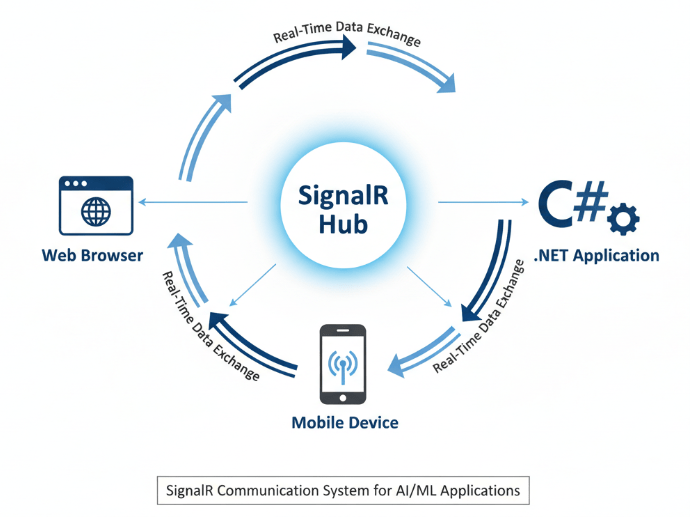
The Magic of Transport Negotiation
One of SignalR’s most powerful features is its ability to automatically select the best transport method based on the client and server capabilities. It attempts to connect in the following order:
- WebSockets: The most efficient protocol, allowing full-duplex communication over a single TCP connection.
- Server-Sent Events (SSE): A standard allowing servers to push data to web pages over HTTP.
- Long Polling: The fallback mechanism where the client polls the server, and the connection stays open until the server has a response.
By abstracting these transport details, SignalR ensures your application remains functional across different environments and browser versions without requiring you to write fallback logic manually.
Why Choose SignalR for Your Next Project?
Before writing code, it is worth understanding the strategic advantages SignalR offers, particularly regarding performance and scalability.
- Reduced Latency: By utilizing WebSockets where possible, SignalR minimizes the overhead of establishing new HTTP connections for every data packet. This is critical for high-frequency trading apps or live gaming dashboards.
- Simplified Development: You write code in C# on the server and use simple libraries for JavaScript, .NET, or Java clients. You don’t need to manage raw sockets.
- Scalability: SignalR is designed to work with scaling providers like Redis or the fully managed Azure SignalR Service. This allows your application to handle massive traffic spikes without managing complex infrastructure.
Step-by-Step: Building a Real-Time Chat Hub
To demonstrate the power of SignalR, we will build the backbone of a simple real-time chat application. We assume you have the .NET SDK installed and a basic understanding of ASP.NET Core.
1. Create the Project
Start by creating a new ASP.NET Core Web App. You can do this via the command line or Visual Studio.
dotnet new webapp -o SignalRChat
2. Create the SignalR Hub
The Hub is the core component. Create a class named ChatHub.cs that inherits from Hub.
using Microsoft.AspNetCore.SignalR;
public class ChatHub : Hub
{
public async Task SendMessage(string user, string message)
{
// This method can be called from the client.
// It receives the message and broadcasts it to all connected clients.
await Clients.All.SendAsync(“ReceiveMessage”, user, message);
}
}
In this snippet, SendMessage is the method the client will call. Clients.All.SendAsync tells the server to invoke the function named “ReceiveMessage” on every connected client, passing along the user and message data.
3. Configure the Server
You need to register SignalR in your dependency injection container and map the route for your Hub. Open Program.cs and add the following lines:
var builder = WebApplication.CreateBuilder(args);
// Add services to the container.
builder.Services.AddRazorPages();
builder.Services.AddSignalR(); // Register SignalR services
var app = builder.Build();
// Configure the HTTP request pipeline.
if (!app.Environment.IsDevelopment())
{
app.UseExceptionHandler(“/Error”);
app.UseHsts();
}
app.UseHttpsRedirection();
app.UseStaticFiles();
app.UseRouting();
app.UseAuthorization();
app.MapRazorPages();
app.MapHub<ChatHub>(“/chathub”); // Map the Hub to a route
app.Run();
4. Implement the Client (JavaScript)
To consume the Hub events, you need the SignalR client library. You can install it using Library Manager (LibMan) or npm (npm install @microsoft/signalr).
Once you have the library, add the following JavaScript to your web page to connect to the Hub:
// Build the connection
const connection = new signalR.HubConnectionBuilder()
.withUrl(“/chathub”)
.build();
// Define what happens when the server sends a message
connection.on(“ReceiveMessage”, function (user, message) {
const msg = user + ” says ” + message;
const li = document.createElement(“li”);
li.textContent = msg;
document.getElementById(“messagesList”).appendChild(li);
});
// Start the connection
connection.start().catch(function (err) {
return console.error(err.toString());
});
// Function to send messages to the server
document.getElementById(“sendButton”).addEventListener(“click”, function (event) {
const user = document.getElementById(“userInput”).value;
const message = document.getElementById(“messageInput”).value;
// Invoke the server method ‘SendMessage’
connection.invoke(“SendMessage”, user, message).catch(function (err) {
return console.error(err.toString());
});
event.preventDefault();
});
This script establishes a connection to /chathub. When the user clicks the “send” button, it invokes SendMessage on the server. Conversely, when the server broadcasts, the connection.on(“ReceiveMessage”, …) block executes, updating the UI instantly.
Scaling Out: Taking Real-Time to Production
Running SignalR on a single server is straightforward, but enterprise applications typically require running across a server farm (multiple instances). The challenge here is that a client connected to Server A cannot inherently receive messages sent from a client connected to Server B.
To solve this, SignalR requires a “backplane.” The backplane forwards messages between server instances so that all clients stay synchronized, regardless of which specific server they are connected to.
Azure SignalR Service
For critical production workloads, the recommended approach is using Azure SignalR Service. This is a fully managed service that handles the scale, connections, and backplane logic for you.
By offloading the connection management to Azure, your application server essentially acts as a simple HTTP API, while Azure manages the thousands of persistent WebSocket connections. This results in significantly lower CPU usage on your web servers and easier scaling capabilities.
Redis Backplane
If you prefer a self-hosted option or are running on-premise, Redis is the industry-standard choice for a SignalR backplane. By configuring SignalR to use Redis, messages are published to the Redis bus and distributed to all other server nodes instantly.
Build faster, smarter applications
Adding real-time functionality is no longer an optional “nice-to-have”—it is a core expectation for modern web applications. SignalR provides a robust, abstracted way to meet this demand within the .NET ecosystem without reinventing the wheel on protocol management.
By following the implementation steps above, you can transform a static interface into a dynamic, engaging experience. Whether you are building a live dashboard for data analytics or a collaborative editing tool, SignalR provides the performance and reliability required to ship confident code.

 Print on Demand Cloud
Leave a comment