
Top Features of .NET 8 Every Developer Should Know
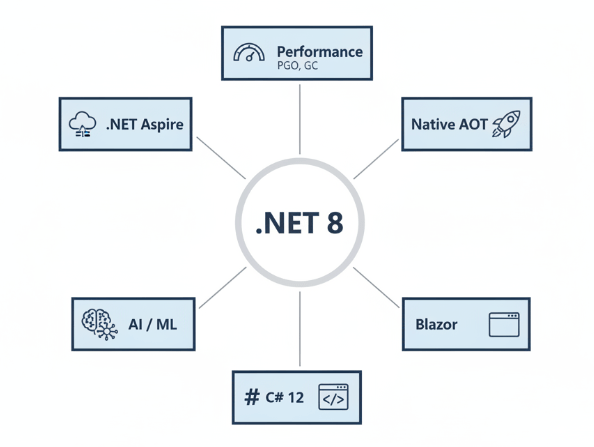
The release of .NET 8 marks a significant milestone in the evolution of Microsoft’s open-source developer platform. As a Long-Term Support (LTS) release, it brings stability, performance enhancements, and a suite of new features designed to streamline development workflows and boost application efficiency.
Whether you are building cloud-native microservices, intelligent AI applications, or high-performance web APIs, .NET 8 offers compelling reasons to upgrade. This update focuses heavily on performance optimization, native AOT (Ahead-of-Time) compilation, and seamless integration with modern cloud environments.
In this article, you’ll learn:
- How Native AOT can drastically reduce startup times and memory footprint.
- The performance gains unlocked by the new dynamic profile-guided optimization (PGO).
- Enhancements to Blazor that unify server and client-side rendering.
- New capabilities in C# 12 that simplify syntax and improve code readability.
Let’s dive into the technical details and explore how these features can optimize your development process.
Performance Improvements: Faster by Design
Performance has always been a core pillar of .NET updates, and version 8 takes this to a new level. Microsoft has introduced optimizations across the entire stack, from the JIT (Just-In-Time) compiler to the garbage collector.
Dynamic Profile-Guided Optimization (PGO)
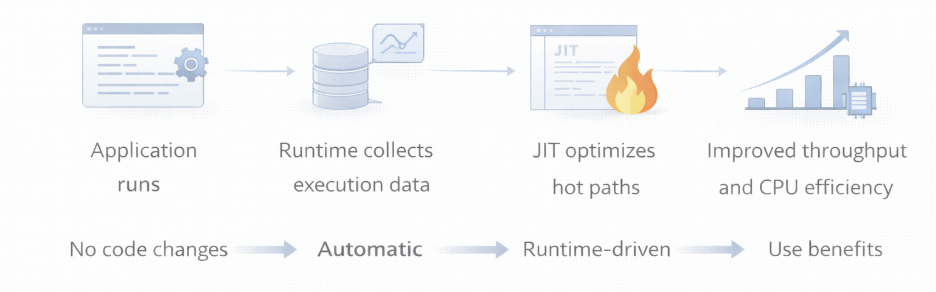
Dynamic PGO is now enabled by default. This feature allows the runtime to collect data about the application’s execution and use that data to optimize the generated code in real-time. By understanding which code paths are frequently executed, the JIT compiler can make smarter decisions about inlining and register allocation.
The result is tangible:
- Reduced CPU usage: Applications run more efficiently, consuming fewer resources.
- Throughput increases: Web APIs and background services can handle more requests per second.
For developers working on high-traffic applications, this “free” performance boost requires no code changes simply retargeting your application to .NET 8 enables these optimizations.
Garbage Collection Updates
The Garbage Collector (GC) has also seen significant improvements. .NET 8 introduces the ability to adjust the memory limit on the fly, a crucial feature for cloud-native applications where resource scaling is dynamic. This ensures that your application can adapt to changing environments without crashing or suffering performance degradation due to memory pressure.
Native AOT: Smaller, Faster, lighter
One of the most anticipated features in .NET 8 is the enhanced support for Native AOT (Ahead-of-Time) compilation. While AOT was available in previous versions, .NET 8 expands its capabilities to support ASP.NET Core apps more robustly.
Why Native AOT Matters
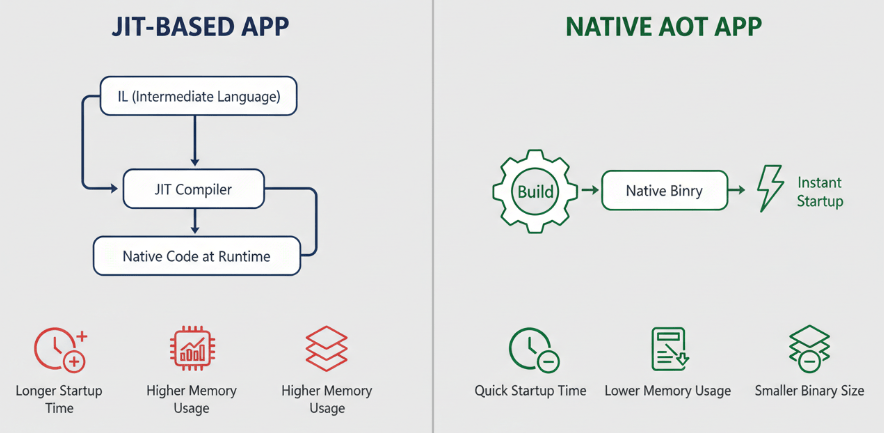
Native AOT compiles your .NET code directly into native machine code during the build process, rather than compiling it to Intermediate Language (IL) that gets JIT-compiled at runtime.
This approach offers two major benefits:
- Lightning-fast startup times: Since there is no JIT compilation step at startup, applications launch almost instantly. This is critical for serverless functions (like Azure Functions or AWS Lambda) where “cold start” latency can impact user experience.
- Reduced memory footprint: Native AOT applications do not need to load the JIT compiler or the full set of runtime libraries, resulting in significantly smaller binaries and lower memory usage.
If you are deploying microservices to Kubernetes or running containerized workloads, Native AOT can help you pack more instances onto the same hardware, optimizing infrastructure costs.
Blazor United: Full Stack Web UI
Blazor has changed how .NET developers build web interfaces, allowing C# to run in the browser. In .NET 8, Microsoft introduces a concept often referred to as “Blazor United” (officially just major updates to Blazor), which aims to bridge the gap between server-side rendering and client-side interactivity.
Static Server Rendering
You can now render Blazor components statically on the server. This means the HTML is generated on the server and sent to the client, providing faster initial load times and better SEO. Unlike previous versions, this doesn’t require an active WebSocket connection (SignalR) for purely static content.
Enhanced Navigation and Form Handling
Blazor in .NET 8 introduces enhanced navigation capabilities that mimic the feel of a single-page application (SPA) even when performing server-side routing. It intercepts navigation events and updates the DOM intelligently without a full page reload.
Additionally, form handling has been improved with support for standard HTML form submissions, making it easier to integrate with traditional web patterns while retaining the power of C#.
C# 12: Writing Cleaner, More Concise Code
Accompanying the platform update is C# 12, the latest version of the language. It introduces several syntactic sugars and features that reduce boilerplate and improve developer productivity.
Primary Constructors for All Classes
Previously limited to record types, primary constructors are now available for all classes and structs. This allows you to define constructor parameters directly in the class declaration.
Before C# 12:
public class UserService
{
private readonly IRepository _repository;
public UserService(IRepository repository)
{
_repository = repository;
}
}
With C# 12:
public class UserService(IRepository repository)
{
// ‘repository’ is available throughout the class
}
This change significantly reduces the verbosity of dependency injection code, a common pattern in enterprise .NET applications.
Collection Expressions
C# 12 simplifies how you create collections. Instead of verbose initialization syntax, you can now use a unified syntax for arrays, lists, and spans.
Example:
// Old way
List<int> numbers = new List<int> { 1, 2, 3 };
// New way
List<int> numbers = [1, 2, 3];
This syntax is not only cleaner but also optimized by the compiler for performance.
AI and Machine Learning Integration
Recognizing the shift toward intelligent applications, .NET 8 includes enhancements specifically for AI and Machine Learning workloads.
System.Numerics.Tensors
The introduction of System.Numerics.Tensors provides a set of APIs for handling multi-dimensional data arrays, which are fundamental to AI models. This improves the interoperability between .NET and AI libraries, making it easier to integrate open-source LLMs or run ONNX models directly within your .NET application.
By adding these primitives directly into the base class library, Microsoft is signaling that .NET is ready for serious AI development, reducing the need for external dependencies when performing data manipulation tasks.
.NET Aspire: Cloud-Native Made Easy
Building distributed, cloud-native applications can be complex. Wiring databases, managing configurations, and handling service discovery often involves a lot of manual setups. .NET 8 introduces .NET Aspire, an opinionated stack designed to simplify this process.
What is .NET Aspire?
Aspire is a curated set of components and tooling that handles the “plumbing” of cloud-native apps. It provides:
- Orchestration: Easily manage multiple projects and containers during local development.
- Components: Pre-configured clients for popular services like Redis, PostgreSQL, and RabbitMQ that include best practices for resilience and observability by default.
- Dashboard: A built-in dashboard to monitor logs, traces, and metrics across your microservices in real-time.
For developers building complex distributed systems, .NET Aspire reduces the cognitive load required to set up a robust development environment.
Upgrading Your Tech Stack
.NET 8 represents a mature, high-performance ecosystem that addresses the needs of modern developers. From the raw speed of Dynamic PGO and Native AOT to the productivity boosts in C# 12 and Blazor, this release offers tangible value for enterprise applications.
Whether you are looking to optimize cloud costs through smaller memory footprints or simply want to write cleaner code, upgrading to .NET 8 is a strategic move. The focus on performance, scalability, and AI readiness ensures that your applications are built on a foundation capable of meeting future demands.
To get started, we recommend running the .NET Upgrade Assistant on your existing projects to identify potential compatibility issues and automate the migration process.

 Print on Demand Cloud
Leave a comment