
How to Use Entity Framework Core for Database Management in .NET
For software engineers and data architects building high performance applications, data management is often the bottleneck that dictates system scalability. Whether you are building a microservice to serve an AI model or a robust backend for a financial application, how you interact with your database matters.
In the .NET ecosystem, Entity Framework (EF) Core has evolved into a lightweight, extensible, and cross-platform Object Relational Mapper (ORM). It eliminates the need for most of the data access code developers traditionally had to write, allowing you to interact with your database using .NET objects.
In this article, you’ll learn:
- How to set up EF Core in a modern .NET environment
- The code first approach to defining data models
- Essential optimization techniques for high performance data retrieval
- How to handle migrations and schema updates efficiently
Understanding the Role of EF Core
At its heart, EF Core serves as a bridge between your code and the database. It allows you to work with data in the form of domain specific objects and properties, such as Customers and Orders, without worrying about yourself with the underlying database tables and columns where this data is stored.
For teams prioritizing rapid development cycles and maintainability, EF Core offers a significant advantage over raw SQL execution (ADO.NET) or lighter ORMs like Dapper, primarily due to its deep integration with the .NET type system and LINQ (Language Integrated Query) support.
Setting Up Your Environment
To begin leveraging EF Core, you must first integrate the necessary dependencies into your project. While EF Core supports various database providers, we will focus on SQL Server for this guide, though the concepts apply broadly to PostgreSQL, MySQL, and Cosmos DB.
You can install the required packages via the NuGet Package Manager or run the following commands in your CLI:
dotnet add package Microsoft.EntityFrameworkCore.SqlServer
dotnet add package Microsoft.EntityFrameworkCore.Tools
The .Tools package is essential as it enables the command line tools required for handling database migrations.
Defining Your Data Model (Code First)
EF Core supports two main development workflows: Code First and Database First. For modern cloud native applications where agility is key, the Code First approach is generally preferred. This allows you to define your database schema using C# classes, keeping your data definitions in version control alongside your application logic.
Here is an example of a simple ModelLog entity, which might track the performance of an AI model in a production environment:
public class ModelLog
{
public int Id { get; set; }
public string ModelName { get; set; }
public double AccuracyScore { get; set; }
public DateTime Timestamp { get; set; }
}
By defining this Plain Old CLR Object (POCO), you have created the blueprint for your database table.
The DbContext Class
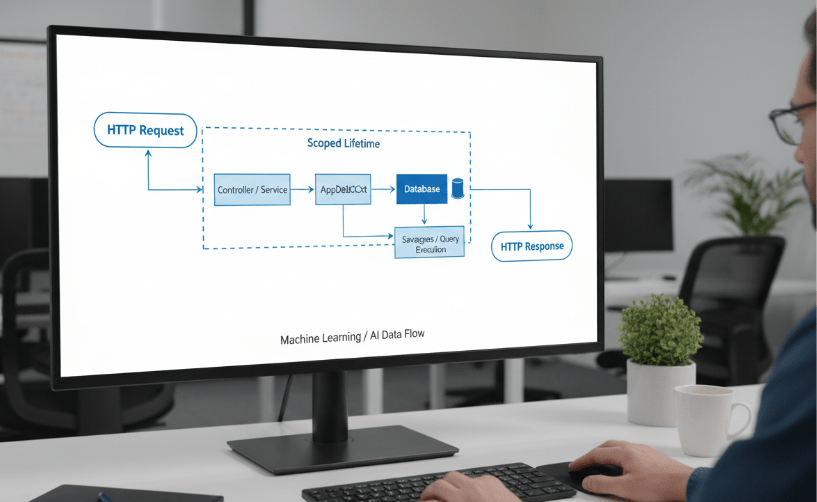
The DbContext class is an integral component of EF Core. It represents a session with the database and can be used to query and save instances of your entities. It acts as a unit of work and repository pattern combination.
To implement this, you create a class that derives from DbContext:
using Microsoft.EntityFrameworkCore;
public class AppDbContext : DbContext
{
public AppDbContext(DbContextOptions<AppDbContext> options) : base(options)
{
}
public DbSet<ModelLog> ModelLogs { get; set; }
}
In your Program.cs or startup configuration, you will register this context with your dependency injection container, providing the connection string necessary to reach your database server.
Managing Migrations and Schema Updates
As your application evolves, your data model will inevitably change. EF Core Migrations provide a way to incrementally update the database schema to keep it in sync with the application’s data model while preserving existing data.
To initialize your database based on the ModelLog class we defined earlier, run:
dotnet ef migrations add InitialCreate
dotnet ef database update
This generates the necessary SQL to create the table structure. When you modify your C# classes later, perhaps adding a LatencyMs field to the ModelLog you simply run the commands again to propagate changes. This workflow ensures that your database schema is as scalable and adaptable as your code.
Performance Optimization Techniques
A common criticism of ORMs is that they can introduce performance overhead compared to raw SQL. However, EF Core includes several features designed to mitigate this, allowing for high performance data handling suitable for enterprise grade applications.
1. Use AsNoTracking for Read Only Queries
When you retrieve data using EF Core, the context automatically tracks changes to those objects. This is useful for updates but adds unnecessary overhead for read only operations. If you are querying data to display on a dashboard or feed into a data pipeline, disable tracking:
var logs = context.ModelLogs
.AsNoTracking()
.Where(l => l.AccuracyScore > 0.9)
.ToList();
This simple change can significantly reduce memory usage and CPU time during large data retrieval operations.
2. Filtering at the Database Level
Ensure that your LINQ queries are translated into SQL and executed on the database server, not in memory. EF Core is generally smart about this, but developers should be wary of “Client Evaluation.” Always filter your data (.Where()) before materializing it (.ToList()).
3. Batching Statements
EF Core automatically batches INSERT, UPDATE, and DELETE statements. If you are adding 1,000 new log entries, EF Core sends them in a single round trip (or very few round trips) to the database rather than 1,000 individual network requests. This behavior is enabled by default and is critical for minimizing latency in high throughput systems.
Integration with Scalable Architectures
For teams building scalable solutions, EF Core integrates seamlessly with established design patterns. It works natively with Dependency Injection (DI) in ASP.NET Core, making it easy to test and mock.
Furthermore, its support for asynchronous programming (await context.SaveChangesAsync()) ensures that your application remains responsive. By freeing threads while waiting for database I/O to complete, your API can handle a higher volume of concurrent requests as a vital success indicator for any high-performance backend.
Maximize Efficiency with Modern Tooling
Entity Framework Core simplifies the complexity of database management without sacrificing the power required for modern applications. By leveraging its code first capabilities and performance features like AsNoTracking and automatic batching, you can build data layers that are both maintainable and efficient.
As you continue to optimize your development stack, remember that the goal is not just to store data, but to make that data accessible and actionable with minimal friction.

 Print on Demand Cloud
Leave a comment