
How to Build High Performance Web Applications with ASP.NET Core
Building a web application that can handle millions of requests per second without breaking a sweat is the gold standard for modern development. In an era where user expectations for speed and responsiveness are at an all-time high, your choice of framework matters more than ever.
Enter ASP.NET Core. Far from the legacy .NET Framework of the past, Core is a cross platform, open-source powerhouse designed for speed and scalability. It consistently ranks as one of the fastest web frameworks in independent benchmarks, often outperforming Node.js and Java Servlet by significant margins.
In this guide, we’ll break down exactly how you can leverage ASP.NET Core to build robust, high performance web applications. You’ll learn about its architectural advantages, how to optimize your code for maximum throughput, and why it’s becoming a critical tool for developers who need to scale.
Why ASP.NET Core for High Performance?
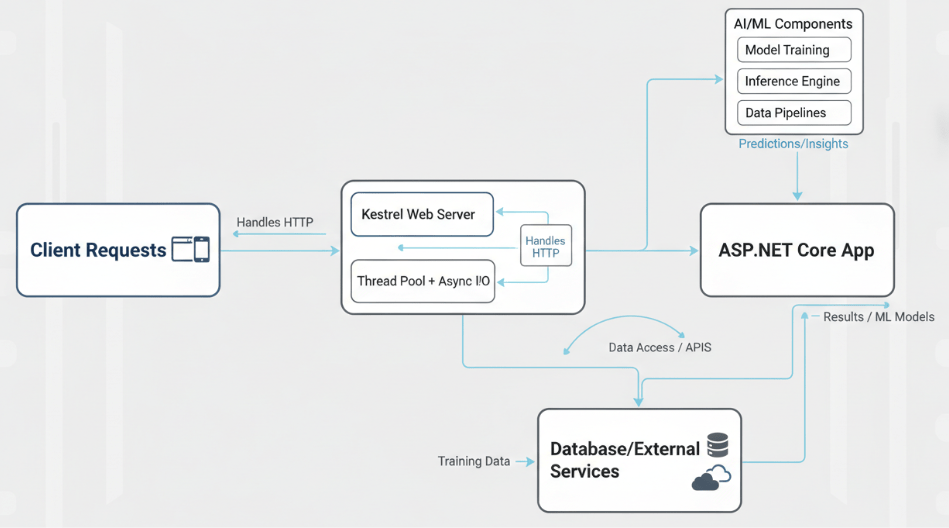
Before we dive into the “how,” let’s examine the “why.” ASP.NET Core isn’t just an update; it’s a complete rewrite. Microsoft designed it with a modular architecture that minimizes overhead, allowing you to include only the packages you need for your specific application. This lightweight approach is a major contributor to its impressive performance metrics.
According to TechEmpower benchmarks, ASP.NET Core has demonstrated the ability to process over 7 million requests per second. Compare this to Node.js, which processed around 0.60 million in the same tests, and you see why performance critical industries are making the switch.
Key Performance Benefits
- Cross Platform capabilities: Run your apps on Windows, Linux, or macOS, allowing you to deploy on the most cost effective and performant infrastructure available (like Linux containers).
- Asynchronous programming: C# and .NET Core have first class support for asynchronous programming patterns (async/await), which is essential for handling I/O bound operations efficiently.
- Unified Stack: You can build your Web UI (with Blazor) and your backend APIs with one language (C#) and one stack, reducing context switching and simplifying the optimization process.
1. Asynchronous Programming with Async/Await
The foundation of high-performance web applications lies in how they handle concurrency. In web development, your server is constantly waiting for a database to query to return, waiting for an external API call, or waiting for file I/O.
If you process these requests synchronously, you block the thread while waiting. In a high load environment, you will quickly run out of available threads, causing your application to stall.
ASP.NET Core solves this with the Task Parallel Library (TPL) and the async and await keywords. By implementing asynchronous programming, you free threads to handle other incoming requests while waiting for the I/O operation to complete.
Best Practice: Ensure your controller actions go “async all the way down.” Do not mix blocking code (like. Result or. Wait()) with asynchronous code, as this can lead to deadlocks and performance degradation.
2. Optimizing Data Access with Entity Framework Core
For most web apps, the database is the primary bottleneck. Even the fastest web server can’t fix a slow query. ASP.NET Core typically pairs with Entity Framework (EF) Core, an Object Relational Mapper (ORM) that is highly optimized but requires careful usage.
To ensure your data layer doesn’t drag down your app:
- Use No Tracking Queries: When retrieving data that you don’t intend to modify, use AsNoTracking(). This bypasses the overhead of setting up change tracking, which significantly improves read performance.
- Pagination is Mandatory: Never return entire datasets to the client. Implementation to retrieve only the data the user needs at that moment.
- Project Your Queries: Instead of selecting all columns (like SELECT *), use .Select() to fetch only the specific fields required for the operation. This reduces the amount of data transferred over the network.
3. Caching Strategies for Scalability
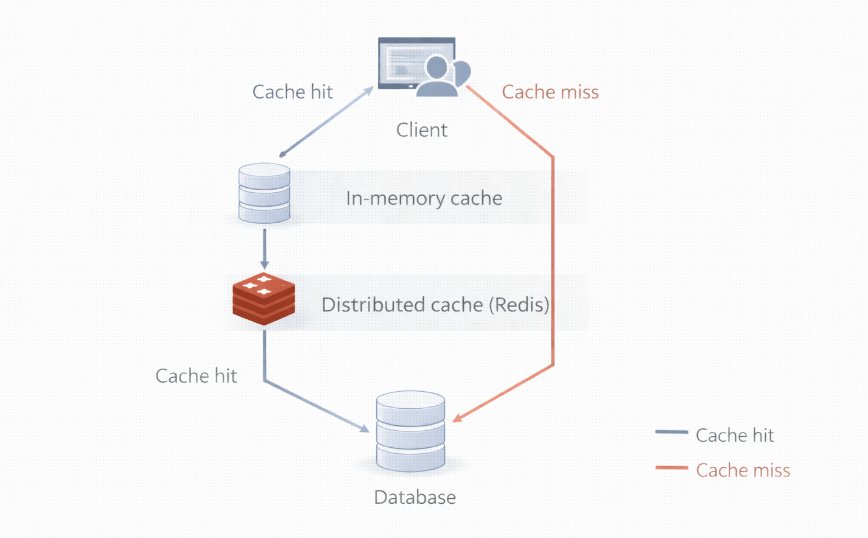
The fastest network request is the one you don’t have to make. Caching is critical for high performance applications because it allows you to serve frequently accessed data from memory rather than hitting the database or external services repeatedly.
ASP.NET Core offers robust support for several caching mechanisms:
In Memory Caching
This stores data in memory of the web server. It’s the simplest form of caching and incredibly fast. It’s ideal for sticky sessions or smaller applications running on a single server.
Distributed Caching
For cloud native and scalable applications running on multiple servers or containers, distributed caching is essential. By using a store like Redis or SQL Server, you ensure that the cache is accessible across all instances of your application. If a user request hits Server A, and the next request hits Server B, the cached data remains available.
Actionable Insight: Identify the “hot paths” in your application for the data that is read frequently but changes rarely and implement a caching strategy immediately.
4. Leveraging Blazor for High Performance UIs
Traditionally, building a rich, interactive web UI meant switching languages to JavaScript frameworks like React or Angular. With ASP.NET Core, you can use Blazor.
Blazor allows you to build interactive web UIs using C# instead of JavaScript. It runs in the browser via WebAssembly or on the server.
- Blazor WebAssembly: Your C# code runs directly in the client’s browser. This offload processing from your server to the client device, which can massively improve scalability for your backend infrastructure.
- Blazor Server: The UI updates are handled over a real time SignalR connection. This is excellent for apps requiring thin clients and rapid load times, as the download size is small.
By keeping your stack unified, you can share code (like validation logic and data models) between the client and server, reducing duplication and potential bugs.
5. Middleware and the Request Pipeline
ASP.NET Core handles requests through a pipeline of middleware components. Each component chooses whether to pass the request to the next component in the pipeline and can perform work before and after the next component.
For high performance, your middleware pipeline should be leaned.
- Order Matters: Place performance critical middleware (like caching or compression) early in the pipeline so they can short circuit the request if possible. If a request can be served from the cache, there is no need to invoke the routing, authentication, or controller logic.
- Response Compression: Use the Response Compression middleware to reduce the size of the payload sent to the client. Smaller responses mean faster transmission times, especially on mobile networks.
6. Deployment and Hosting
You can build the fastest code in the world, but your infrastructure needs to support it. ASP.NET Core’s cross platform opens up high performance hosting options.
- Kestrel: This is the default, cross-platform web server for ASP.NET Core. It is optimized for high throughput and should be used for all deployments.
- Reverse Proxy: In production, it is common to run Kestrel behind a reverse proxy like Nginx, Apache, or IIS. This adds a layer of security and load balancing.
- Containerization: ASP.NET Core is built for containers. Deploying your app in Docker containers allows you to orchestrate scaling with tools like Kubernetes, ensuring your app can handle traffic spikes by spinning up new instances instantly.
Next Steps for Developers
Building high performance applications is an iterative process. It requires understanding your tools, profiling your code, and constantly looking for bottlenecks. ASP.NET Core provides the raw speed and architectural flexibility to build world class software, but the implementation is up to you.
To get started with your high-performance journey, we recommend exploring the official Microsoft learning paths. Whether you are building real time apps with SignalR, RESTful APIs, or full stack web apps with Blazor, the ecosystem has the tools you need.
Start by auditing your current data access patterns and introducing asynchronous handling where it’s missing. Small optimizations in these areas often yield the biggest ROI for performance.

 Print on Demand Cloud
Leave a comment