
How to Migrate Legacy Applications to the Cloud
Legacy infrastructure often acts as a bottleneck for modern AI development. While your team wants to deploy scalable AI solutions and optimize model training, you are likely stuck managing hardware constraints, limited processing power, and monolithic architectures that refuse to play nice with modern frameworks like PyTorch or TensorFlow.
Migrating legacy applications to the cloud isn’t just about saving data center costs; it is a critical step for unlocking high performance computing resources required for advanced data science. By moving to a cloud native environment, you gain the agility to scale resources up or down based on training loads, integrate seamlessly with cutting edge tools, and significantly reduce operational overhead.
In this article, you will learn:
- The strategic value of migration for AI and data workloads
- How to choose the right migration strategy (The 6 R’s)
- A step-by-step guide to executing a migration plan
- Best practices for handling data integrity and minimizing downtime
Why Migration Matters for AI Workloads
For software engineers and data scientists, the on premise vs. cloud debate is usually settled by one factor: scalability. Legacy systems typically rely on static resource allocation. If you need to train a complex model that requires 100 GPUs for a week, acquiring that hardware physically is slow and expensive.
Cloud environments offer elasticity. You can provision high performance computing clusters for the duration of a training run and decommission them immediately after, optimizing both performance and budget.
Key benefits include:
- High Performance: Access specialized hardware (TPUs, GPUs) tailored for machine learning tasks without capital expenditure.
- Seamless Integration: Modern cloud platforms offer native support for containerization (Docker, Kubernetes) and CI/CD pipelines, making it easier to deploy and update models.
- Real time Processing: Cloud architectures support event driven data streams, enabling real-time data insights that legacy batch processing systems struggle to handle.
Selecting Your Migration Strategy: The 6 R’s
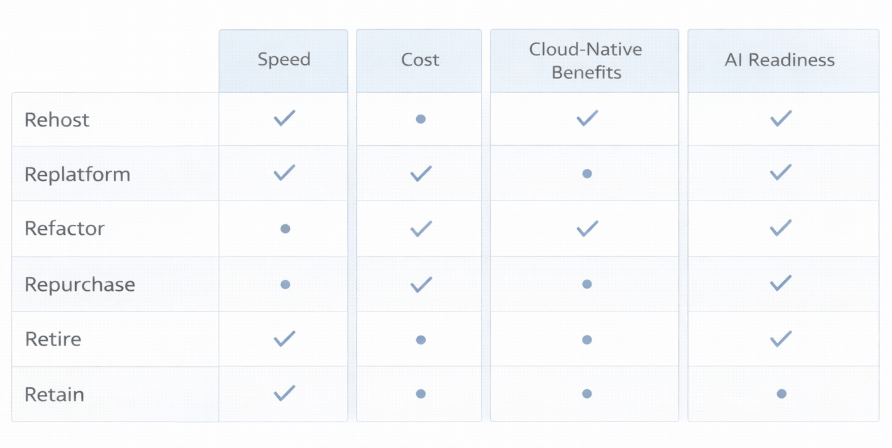
Not all applications require the same approach. Amazon Web Services (AWS) popularized the “6 R’s” framework, which remains the industry standard for categorizing migration strategies. Understanding this distinction is vital for determining technical feasibility and ROI.
1. Rehost (Lift and Shift)
This involves moving applications to the cloud without making changes to the underlying code.
- Pros: Fast, low risk, immediate cost savings on hardware.
- Cons: You won’t gain cloud native benefits like auto scaling.
- Use Case: ideal for simple legacy apps that do not require immediate optimization but need to vacate a data center quickly.
2. Replatform (Lift, Tinker, and Shift)
Here, you make a few cloud optimizations without changing the core architecture. For example, migrating a self-hosted database to a managed service like Amazon RDS or Google Cloud SQL.
- Pros: Reduces operational burden (patching, backups) with minimal code changes.
- Cons: Still limits the full potential of cloud elasticity.
- Use Case: Great for applications where database management is a pain point.
3. Refactor (Re-architect)
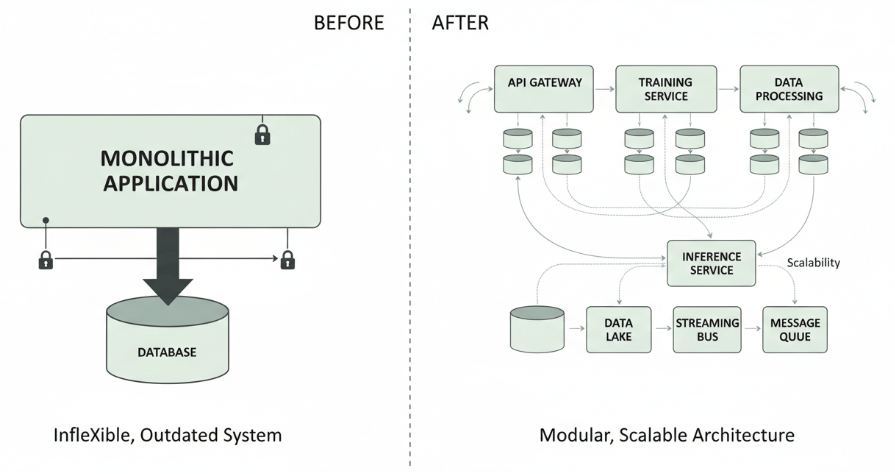
This is the most transformative approach. It involves re-imagining the application architecture, typically breaking a monolith into microservices.
- Pros: Enables full scalability, fault tolerance, and the ability to use serverless functions.
- Cons: High cost, time consuming, and requires advanced skills.
- Use Case: Critical for AI applications needing independent scaling for training and inference components.
4. Repurchase
Moving to a SaaS product (e.g., dropping a legacy CRM for Salesforce). This is less relevant for custom AI models but useful for peripheral business tools.
5. Retire
Identifying applications that are no longer useful and turning them off.
6. Retain
Keeping applications as is on premises because migration is too complex, or compliance regulations require data to stay local.
Step by Step Migration Process
Once you have selected a strategy (likely Replatforming or Refactoring for high value AI projects), follow these steps to ensure a smooth transition.
Phase 1: Assessment and Planning
Before moving a single byte, conduct a thorough audit of your current environment.
- Dependency Mapping: Identify all libraries, databases, and third-party API connections. Legacy apps often have hard coded dependencies that break in the cloud.
- Performance Baselines: Record current latency, throughput, and error rates. You need these metrics to verify success post migration.
- Data Audit: Classify your data (structured vs. unstructured) and check for compliance requirements (GDPR, HIPAA).
Phase 2: Design the Cloud Architecture
For AI developers, this phase is about designing for the future.
- Containerization: If you are refactoring, wrap your application components in containers. This ensures consistency across development, testing, and production environments.
- Orchestration: Plan to use Kubernetes for managing containerized applications. It provides automated deployment and scaling essential for managing heavy computer loads.
- Storage Strategy: Decide where your data will live. Object storage (like S3 or Blob Storage) is usually preferred for unstructured data used in training datasets.
Phase 3: Data Migration
Moving data is often the riskiest part of the process. “Data gravity” the idea that data attracts applications and services means moving large datasets can be slow.
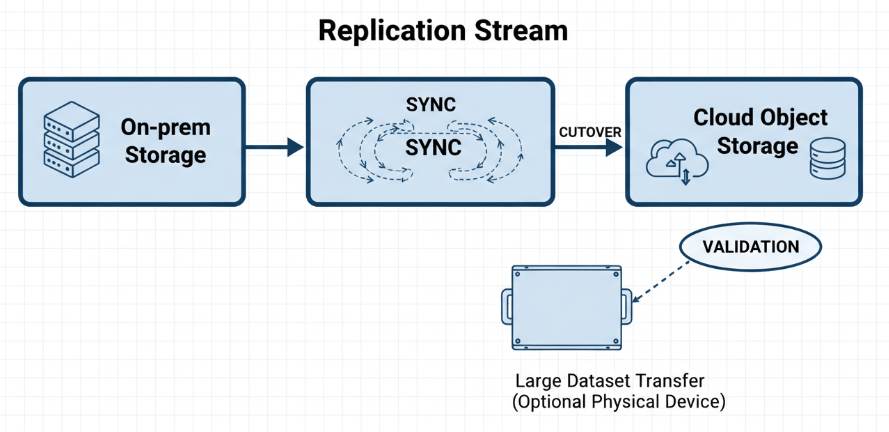
- Offline Transfer: For petabyte scale data, consider physical transfer devices (like AWS Snowball) to bypass network bandwidth limits.
- Sync Mechanisms: Set up replication to keep the cloud database in sync with the on-prem database until the cutover.
Phase 4: Application Migration and Testing
Move your application logic. If you are refactoring, this is where you deploy your microservices.
- Validation: Run your performance baselines against the new cloud environment. Does the model train faster? Is inference latency lower?
- Security Testing: Ensure that your IAM (Identity and Access Management) roles are correctly configured. Cloud security operates on a shared responsibility model, and misconfiguration is a common vulnerability.
Phase 5: Cutover
Once testing confirms stability and performance improvements, switch your DNS traffic to the cloud environment.
- Canary Deployment: Route a small percentage of traffic to the cloud version first. Monitor errors before rolling out to 100% of users.
Overcoming Common Migration Challenges
Even with a solid plan, you might encounter hurdles. Here is how to navigate common issues:
Integration with Existing Tools
Challenge: Your legacy app might rely on outdated protocols not supported by modern cloud APIs.
Solution: Use an API Gateway to act as a bridge between your modern cloud services and any remaining legacy components. This decouples the frontend from the backend, allowing you to modernize the backend over time without breaking the user experience.
Unexpected Costs
Challenge: The “pay as you go” model can spiral if resources aren’t managed.
Solution: Implement budget alerts and auto scaling policies immediately. For AI training, use “Spot Instances” (spare compute capacity available at steep discounts) for non-critical workloads.
Skill Gaps
Challenge: Your team might be experts in Python and TensorFlow but less experienced with cloud infrastructure.
Solution: Invest in training or utilizing managed services (like Amazon SageMaker or Google Vertex AI) that abstract away much of the infrastructure management, allowing your data scientists to focus on the code.
Future Proofing Your AI Operations
Migrating legacy applications is a significant undertaking, but the ROI is clear. By moving to the cloud, you break free from the hardware limitations that stifle innovation. You gain the ability to boost your AI capabilities through elastic compute, integrate seamless CI/CD pipelines, and deploy scalable solutions that grow with your business.
To get started, do not try to boil the ocean. Pick a single, non-critical workload to migrate first. Use it as proof of concept to validate your architecture and build team confidence. Once you have a win under your belt, you can tackle the core legacy systems that are holding your data projects back.

 Print on Demand Cloud
Leave a comment