
How to Optimize Cloud Costs Without Compromising Performance
You’ve built a robust model using PyTorch or TensorFlow, and your initial benchmarks look promising. Accuracy is high, and inference times are within acceptable limits. But as you move from a sandbox environment to production, a new variable enters the equation: cost.
For many engineering teams, the excitement of deploying scalable AI solutions is quickly dampened by the reality of the monthly cloud bill. The challenge lies in the “Iron Triangle” of engineering: speed, quality, and cost. Typically, you’re told you can only pick two.
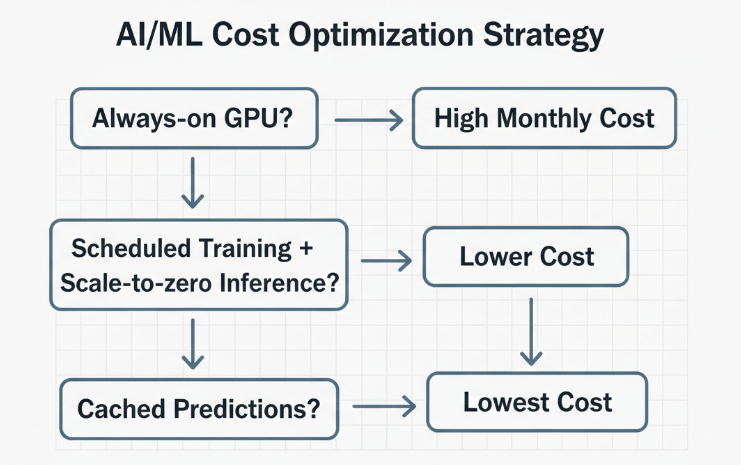
However, in modern cloud architecture, tradeoffs are becoming less rigid. By leveraging the right strategies from rightsizing compute instances to implementing advanced model quantization, you can significantly reduce operational costs while maintaining high performance standards.
In this article, you’ll learn:
- How to select the precise compute resources for training versus inference.
- Strategies for optimizing your code and models to reduce resource consumption.
- The role of spot instances and auto scaling in budget management.
- How to utilize observability tools to prevent billing surprises.
Rightsized Your Compute Resources
The most common source of cloud waste is over provisioning. Developers often select instance types based on peak load requirements rather than average usage, leading to idle resources that drain the budget.
Distinguish Between Training and Inference
Training a model and running inference require vastly different resource profiles.
- Training: This is computed intensive and benefits from high performance GPUs. However, it is often a batch process. You don’t need these expensive instances running 24/7.
- Inference: This often requires lower latency but less raw power. CPU based instances or specialized inference chips (like AWS Inferentia or Google TPUs) can often handle the load at a fraction of the cost of a full GPU instance.
Select the Right Instance Families
Cloud providers offer a dizzy array of instance types. To optimize model training and deployment:
- Analyze your bottlenecks: Is your workload CPU bound, memory bound, or network bound?
- Match the instance: If your application is memory intensive (common with large language models), choose memory optimized instances rather than general purpose ones.
- Use specific accelerators: For deep learning workloads, utilize instances equipped with hardware specifically designed for matrix math, rather than generic GPUs.
Leverage Spot Instances for Fault Tolerant Workloads
Spot instances (or preemptible VMs) offer unused cloud capacity at steep discounts often up to 90% off on demand prices. The catch is that the provider can reclaim these instances with very little notice.
While you might hesitate to use these for a customer facing API where uptime is non-negotiable, they are perfect for:
- Model Training: If you implement regular checkpointing in your Python scripts, you can resume training exactly where you left off if an instance is preempted.
- Batch Processing: Large scale data processing jobs that can handle interruptions are ideal candidates for spot instances.
- Development Environments: For R&D tasks that don’t require 99.99% availability, spot instances can drastically stretch your budget.
Optimize Your Model and Code
Sometimes the best way to save on infrastructure is to make your software more efficient. Bloated code or unoptimized models consume more compute cycles, directly translating to higher costs.
Model Quantization and Pruning
You don’t always need 32-bit floating-point precision. Techniques like quantization allow you to reduce the precision of your model parameters (e.g., to 8-bit integers) with minimal impact on accuracy.
- Quantization: Reduces the model size and speeds up inference, allowing you to run models in smaller, cheaper instances.
- Pruning: Involves removing neurons that contribute little to the model’s output. This results in a sparser, lighter model that is faster to execute.
Efficient Data Pipelines
Bottlenecks in data loading can leave expensive GPUs idling while they wait for data.
- Prefetching: Ensure your data pipeline (using tools like tf.data or torch.utils.data) prefetches data so the GPU always has work to do.
- Data Formats: Use binary formats like TFRecord or Parquet instead of raw text or CSVs to speed up I/O operations.
Implement Intelligent Auto Scaling
Static provisioning is a budget killer. If you provide peak traffic, you pay for unused capacity at night. If you provide average traffic, you suffer performance degradation during spikes.
Scalable solutions that adapt to real-time demand are essential.
- Scale to Zero: For sporadic workloads, consider serverless architectures (like AWS Lambda or Google Cloud Run). These allow you to scale your costs down to zero when no requests are coming in.
- Metric Based Scaling: Don’t just scale base on CPU usage. For AI applications, scales are based on inference to queue depth or latency metrics. This ensures you add resources exactly when the user experience is at risk and remove them immediately after the spike subsides.
Master Storage Lifecycle Management
Data is fuel for AI but storing it is expensive. Not all data needs to be on high performance storage tiers.
- Hot Storage: Keep frequently accessed data (current training sets, recent logs) on high throughput SSDs.
- Warm/Cold Storage: Move older datasets, model artifacts, and archived logs to lower cost object storage classes (like S3 Infrequent Access or Glacier).
- Lifecycle Policies: Automate this movement. Set policies to automatically transition data to cheaper tiers after a set period of inactivity.
Monitor and Tag Everything
You cannot fix what you cannot measure. Visibility is the foundation of cost optimization.
Tagging Strategy
Implement a rigorous tagging strategy for all cloud resources. Tag by:
- Project/Team: Identify which internal teams are driving costs.
- Environment: Separate production, staging, and development costs.
- Function: Distinguish between data processing, training, and inference.
Set Budgets and Alerts
Don’t wait for the end of month’s bill to find out a script ran wild. Set up budget alerts that trigger when spending exceeds a defined threshold or when forecasted spend deviates from the norm. This allows for real-time intervention.
Frequently Asked Questions
Will using spot instances affect my model training time?
It can, but usually not significantly. If an instance is reclaimed, there is a delay while a new instance is provisioned, and the checkpoint is loaded. However, the cost savings (often 70-90%) usually outweigh the slight increase in total wall clock time.
Is it difficult to integrate these optimizations with existing Python tools?
Most modern frameworks like TensorFlow and PyTorch have been built in support of optimization. For example, quantization is often just a few lines of code, and cloud SDKs integrate seamlessly for managing auto scaling and spot instances.
How much can I realistically save?
While results vary, we typically see organizations reduce their cloud AI spend by 30% to 50% by combining rightsizing, spot instances, and auto scaling, without degrading application performance.
Build a Cost Aware Culture
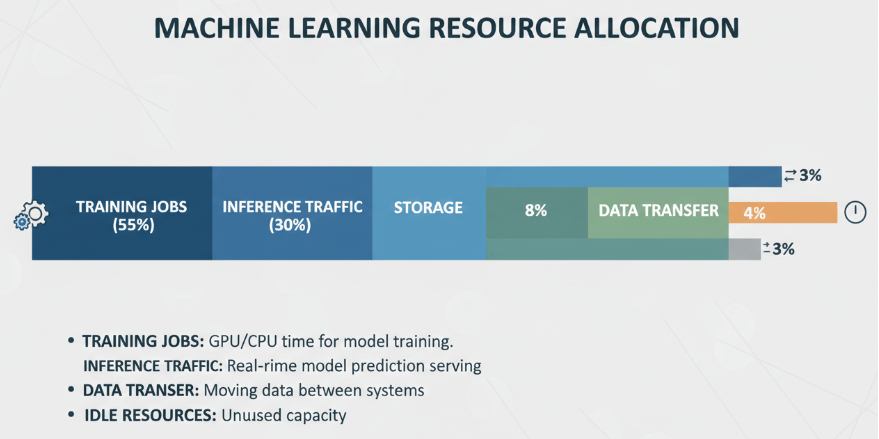
Optimizing cloud costs isn’t a one-time task; it’s an ongoing discipline. By integrating cost considerations into your architectural decisions from the data types you choose to the instance families you deploy you create a sustainable path for growth.
High performance doesn’t have to mean a high cost. With the right strategy, you can boost your AI capabilities and deploy scalable solutions that keep both your users and your finance team happy.
Ready to dive deeper into optimizing your specific architecture? Start by auditing your current resource utilization and identifying your idle instances.

 Print on Demand Cloud
Leave a comment