
A Beginner’s Guide to Serverless Computing with AWS Lambda
For data scientists and software engineers, the infrastructure bottleneck is a familiar frustration. You have built a high-performance model in PyTorch or TensorFlow, and you are ready to deploy. But suddenly, you are bogged down by provisioning EC2 instances, managing auto scaling groups, and worrying about idle server costs.
This is where serverless computing enters the conversation. AWS Lambda allows you to run code without provisioning or managing servers, shifting your focus back to where it belongs: the code and the data.
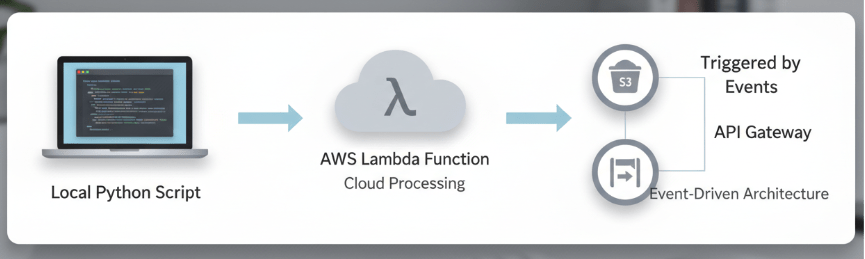
In this guide, we will explore how AWS Lambda functions as a critical tool for modern AI/ML workflows. We will break down how it works, why it matters for scalable AI solutions, and how to deploy your first function.
What is Serverless Computing?
“Serverless” is a bit of a misnomer. Servers still exist, but they are abstracted away from you. You do not patch them, scale them, or maintain the operating system. In the AWS ecosystem, this is primarily handled by AWS Lambda.
Lambda operates on a Function as a Service (FaaS) model. You upload your code (a “function”), and AWS handles the compute resources required to run that code in response to specific events. Whether you are processing one request a day or thousands per second, Lambda scales automatically to match the demand.
Why AWS Lambda for AI and Data Science?
For intermediate expert developers in the data space, Lambda offers specific advantages over traditional server-based deployments.
1. Cost Efficiency
With traditional instances (like EC2), you pay for the server as long as it is running, regardless of whether it is processing data. With Lambda, you pay only for the computer time you consume down to the millisecond. This is ideal for sporadic workloads, such as a model inference of API that sees traffic spikes during business hours but goes quiet at night.
2. Seamless Scalability
One of the biggest challenges in deploying AI models is handling bursty traffic. If your application suddenly goes viral, a traditional server might crash. Lambda automatically scales out, running parallel copies of your function to handle incoming requests. This ensures your real-time data insights remain available even under heavy load.
3. Integration with the Data Stack
Lambda integrates natively with the tools you likely already use. It supports Python as a first-class citizen, allowing you to bring your existing logic into the serverless environment. Furthermore, it acts as the glue between AWS services, easily triggering code based on events in Amazon S3 (for data processing) or Amazon API Gateway (for model serving).
Core Concepts of AWS Lambda
Before writing code, it is essential to understand the architectural components.
The Function
This is your code. It contains the logic you want to execute, such as a data transformation script or a lightweight inference model.
The Trigger
A trigger is the resource or event that causes your function to be executed. Common triggers in data workflows include:
- S3: A file is uploaded to a bucket.
- API Gateway: An HTTP request is received.
- CloudWatch Events: A scheduled time (like a cron job) occurs.
The Handler
The handler is the specific method within your code that Lambda calls to begin execution. It takes two arguments:
- Event: Data passed to the function (e.g., the JSON body of an API request).
- Context: Runtime information about the Lambda environment.
Lambda Layers
For data scientists, Layers are perhaps the most critical feature. Standard Lambda environments are lightweight. If your project requires heavy libraries like NumPy, Pandas, or Scikit to learn, you cannot just pip install them at runtime. Instead, you package these dependencies into a “Layer” in a .zip file archive that can be attached to multiple functions. This keeps your deployment package small and manages dependencies efficiently.
Deployment Guide: Your First Python Function
Let’s walk through setting up a basic function to process data.
Step 1: Create the Function
Navigate to the Lambda console in AWS and click Create function.
- Select Author from scratch.
- Name your function (e.g., DataProcessor).
- Choose Python 3.x as the runtime.
Step 2: Configure Permissions
Lambda needs permission to access other AWS services. Under Permissions, you can create a new execution role. If your code needs to be read from an S3 bucket, ensure you attach the necessary IAM policy to this role later.
Step 3: Write the Code
In the code source editor, you will see a default lambda_handler. Here is a simple example that mimics receiving data and processing it:
import json
def lambda_handler(event, context):
# Parse incoming data
data = event.get(‘data’, {})
# Perform a simple operation (mock data cleaning)
result = {k: v.upper() for k, v in data.items() if isinstance(v, str)}
return {
‘statusCode’: 200,
‘body’: json.dumps(result)
}
Step 4: Test the Function
Click the Test tab. Create a new test event with the following JSON:
{
“data”: {
“name”: “alpha”,
“status”: “active”
}
}
Click on Test again. You should see a successful execution result returning the capitalized values.
Real World Scenarios for AI Professionals
While the example above is basic, Lambda is powerful enough for complex production scenarios.
Real Time Data Preprocessing
Imagine you are building a computer vision pipeline. Users upload images to an S3 bucket. You can configure S3 to trigger a Lambda function immediately upon upload. This function can resize the image, normalize pixel values, and save the processed tensor back to a different bucket, ready for training. This enables real-time data processing without a dedicated server for image manipulation.
Model Inference on the Edge
For smaller models (like MobileNet or specific Scikit learn classifiers), you can host the model directly inside a Lambda function. By putting Amazon API Gateway in front of it, you create a scalable, serverless API endpoint that delivers predictions to your application users instantly.
Note: For Large Language Models (LLMs) or heavy Deep Learning models, Lambda might not be the right fit due to size and compute limits. In those cases, AWS SageMaker is the preferred alternative.
Challenges and Best Practices
To successfully adopt serverless architecture, you must navigate a few technical constraints.
The “Cold Start” Problem
When a Lambda function hasn’t been invoked for a while, AWS spins down the container to save resources. The next request requires AWS to initialize a new environment, causing a latency delay known as a “cold start.”
- Solution: For latency sensitive applications, use Provisioned Concurrency, which keeps a specified number of environments initialized and ready to respond.
Timeouts and Memory
Lambda functions have a maximum execution time of 15 minutes and a memory limit of 10 GB.
- Guidance: Do not use Lambda for long running model training jobs. If your data processing takes longer than 15 minutes, consider breaking the task into smaller steps using AWS Step Functions or moving the workload to AWS Fargate or SageMaker.
Version Control and CI/CD
Avoid editing code directly into the console for production applications.
- Best Practice: Use tools like the AWS Serverless Application Model (SAM) or terraform to define your infrastructure as code. This allows you to version control your Lambda configurations alongside your application code.
Next Steps for your Cloud Journey
AWS Lambda offers a streamlined path to deploying scalable, efficient code. By abstracting infrastructure management, it allows your team to focus on optimizing model performance and delivering value.
To further improve your development process and build reliable AI powered automation right now, we recommend starting small. Identify a data cleaning script or a lightweight inference task in your current workflow and migrate it to Lambda. Measure the performance and cost difference you will likely find the results compelling.

 Print on Demand Cloud
Leave a comment