
The Benefits of Using Blazor for Web Development in .NET
Web development has long required a distinct separation of skills: server-side logic in languages like C# or Java, and client-side interactivity exclusively in JavaScript. For .NET developers, this often meant juggling two different ecosystems, managing context switching, and duplicating logic across the stack.
Blazor changes this paradigm completely. By allowing developers to build interactive web UIs using C# instead of JavaScript, it unifies the development experience under the .NET umbrella.
In this article, we’ll explore the core benefits of Blazor, how it integrates with the existing .NET ecosystem, and why it’s become a viable, high-performance alternative to traditional JavaScript frameworks like React or Angular for enterprise applications.
What is Blazor?
Blazor is a framework for building interactive client-side web UI with .NET. It allows you to write your client-side logic in C#, which can then run directly in the browser using WebAssembly or on the server with SignalR.
This isn’t just a wrapper around JavaScript libraries; it’s a fundamental shift in how .NET developers approach the frontend. You can share code, libraries, and types between the client and server, significantly reducing development friction.
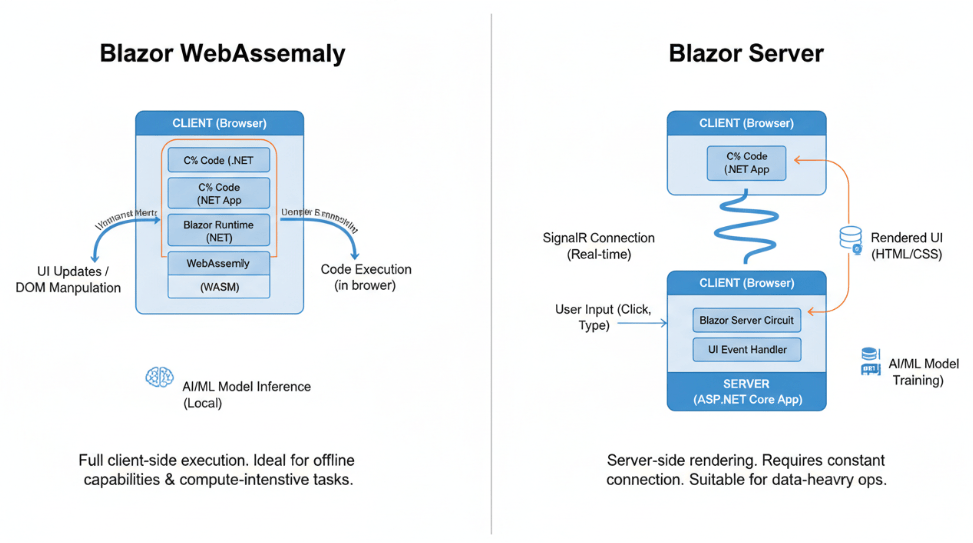
There are two primary hosting models:
- Blazor WebAssembly (WASM): Your app runs entirely in the browser on a WebAssembly-based .NET runtime.
- Blazor Server: Your app runs on the server, and UI updates are handled over a real-time SignalR connection.
Key Benefits of Adopting Blazor
For teams already invested in the Microsoft stack, Blazor offers compelling advantages that streamline the development lifecycle.
1. Unification of the Tech Stack (C# Everywhere)
The most immediate benefit is the ability to use C# for both client-side and server-side code. This “full-stack” C# capability eliminates the need for .NET developers to become experts in the nuances of modern JavaScript frameworks.
You can leverage the strong typing, compile-time checking, and rich tooling of C# across your entire application. This reduces the cognitive load on developers, who no longer need to mentally switch between languages when moving from a backend API controller to a frontend component.
2. Code Reusability and Sharing
One of the biggest pain points in traditional web development is duplicating logic. For example, validation logic often needs to exist in the frontend (for immediate user feedback) and the backend (for security and data integrity).
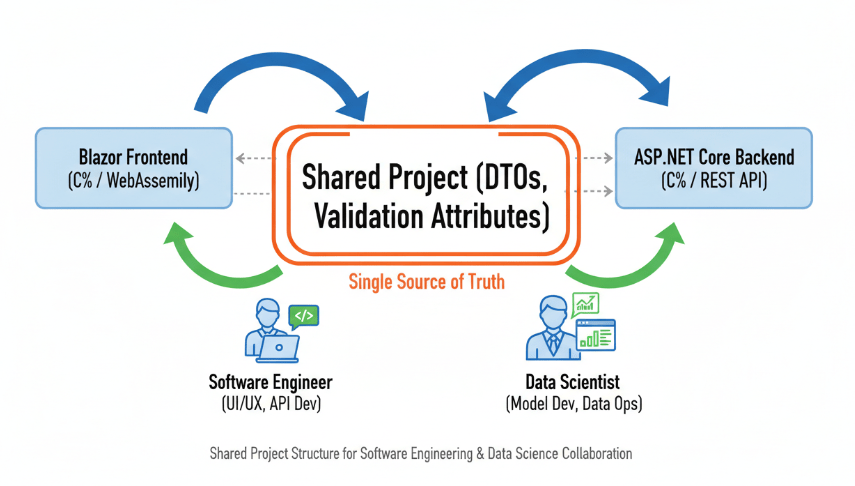
With Blazor, you can define a Shared project containing your Data Transfer Objects (DTOs) and validation logic (using attributes like [Required] or [StringLength]). Both your Blazor frontend and your ASP.NET Core backend can reference this same library. If you update a validation rule, it reflects instantly across the entire stack.
3. High Performance with WebAssembly
Blazor WebAssembly allows .NET code to run in the browser at near-native speeds. WebAssembly (WASM) is a binary instruction format that allows code written in languages other than JavaScript to run on the web.
While the initial download size can be larger than a typical JS bundle (since it downloads the .NET runtime), the performance for computation-heavy tasks within the browser is impressive. For applications that require complex logic, data processing, or calculations on the client side, Blazor WASM offers a robust solution without relying on server round-trips.
4. Seamless Integration with the .NET Ecosystem
Blazor doesn’t exist in a vacuum; it sits comfortably on top of the mature .NET ecosystem. This means you have immediate access to:
- NuGet Packages: You can use millions of existing .NET libraries directly in your frontend application.
- Dependency Injection: Blazor has built-in support for DI, making it easy to manage services and components just like you do in ASP.NET Core.
- Tooling: You get the full power of Visual Studio and VS Code, including IntelliSense, refactoring tools, and world-class debugging capabilities.
5. Component-Based Architecture
Like modern JavaScript frameworks (React, Vue, Angular), Blazor uses a component-based architecture. You build your UI out of reusable, self-contained chunks of code called Razor components (.razor files).
These components encapsulate their HTML markup and C# logic. They can be nested, reused, and shared between projects. This modular approach makes large enterprise applications easier to maintain and scale over time.
Blazor Server vs. Blazor WebAssembly: Which One to Choose?
Choosing the right hosting model is critical to the success of your project.
Blazor Server
In this model, the app executes the server from within an ASP.NET Core app. UI updates, event handling, and JavaScript calls are handled over a SignalR connection.
- Pros: fast initial load times (no need to download the runtime), code stays on the server (better security), supports thin clients.
- Cons: requires constant network connection, higher latency for interactions, higher server load.
- Best for: Intranet applications, internal tools, or apps where client devices are low powered.
Blazor WebAssembly
The app, its dependencies, and the .NET runtime are downloaded to the browser. The app executes directly on the browser UI thread.
- Pros: runs offline, offloads work from the server to the client, feels like a native app.
- Cons: larger initial download size, restricted by browser sandbox capabilities.
- Best for: Public-facing applications, PWAs (Progressive Web Apps), and apps requiring offline capabilities.
With .NET 8, Microsoft introduced “Blazor United” (part of the new Blazor Web App template), which allows you to mix and match these render modes at the component level, giving you the best of both worlds.
Is Blazor Enterprise Ready?
Scalability and long-term support are major concerns for enterprise adoption. Blazor is not an experimental project; it is a fully supported product from Microsoft, shipping with the standard .NET release cycle.
Companies in finance, healthcare, and logistics are already using Blazor to modernize legacy WinForms or WPF applications, migrating them to the web while retaining much of their existing business logic. The ability to reuse existing .NET Standard libraries means migration paths are often shorter compared to rewriting an application entirely in React or Angular.
Summary
Blazor represents a significant leap forward for .NET developers. It removes the barrier between server and client, allowing you to build rich, interactive web applications using the language and tools you already love.
To recap, the key advantages include:
- Full-stack C# development: No need to master complex JavaScript toolchains.
- Shared logic: Define data models and validation once, use them everywhere.
- Performance: Leverage WebAssembly for near-native execution speed.
- Ecosystem: Access to NuGet packages and enterprise-grade tooling.
For teams looking to streamline their development process and reduce context switching, Blazor offers a powerful, scalable, and modern solution for web development.

 Print on Demand Cloud
Leave a comment