
How to Integrate AI Features into Your Web Framework Projects
Building a web application used to manage databases, user authentication, and responsive UIs. Today, the landscape has shifted. Users expect intelligent features from personalized recommendations and natural language search to automated content generation. For developers, this means the challenge is no longer just “building a web app,” but seamlessly integrating complex Artificial Intelligence (AI) models into traditional web frameworks.
Integrating AI isn’t simply about installing a library or making an API call. It requires a fundamental rethink of your application architecture. You must consider latency, computational costs, and the stateless nature of HTTP against the state heavy requirements of machine learning models.
In this article, you will learn:
- How to decouple your AI logic from your main application for better scalability.
- The best frameworks and tools for bridging the gap between web development and data science.
- Strategies for handling long running inference tasks without ruining the user experience.
- Performance optimization techniques to keep your application responsive.
The Architectural Challenge: Decoupling Inference from Interface
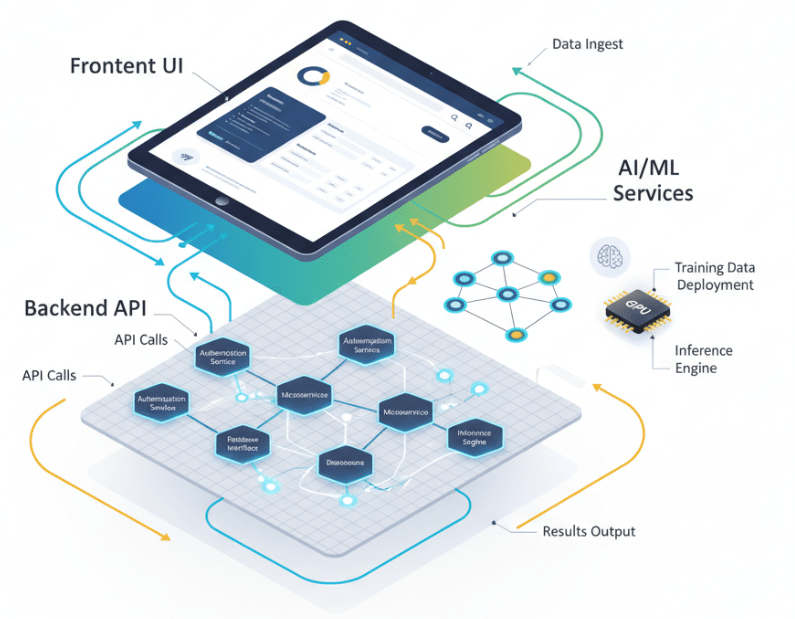
The most common mistake developers make when adding AI to a web project is tightly coupling the Machine Learning (ML) model with the web server. Loading a massive TensorFlow or PyTorch model directly into your main web process can lead to disastrous memory usage and significant latency. If your model takes 500ms to generate a prediction, your web server is blocked for that entire duration, killing your throughput.
The solution lies in a microservices architecture. By treating your AI component as a standalone service, you gain several advantages:
- Scalability: You can scale your web server (handling lightweight HTTP requests) independently from your AI service (handling heavy computational loads).
- Flexibility: Your web app might be written in Node.js or Ruby, but your AI service can run in Python, where the ML ecosystem is strongest.
- Reliability: If the AI service crashes or hangs, it doesn’t take down your entire user interface.
Choosing the Right Tech Stack
While you can technically run AI in many languages, Python remains in the industry standard for a reason. Its rich ecosystem of libraries like NumPy, Pandas, Scikit learn, TensorFlow, and PyTorch makes it the logical choice for the backend of your AI service.
The Backend: FastAPI vs. Flask vs. Django
When building the API that wraps your model, performance is paramount.
- FastAPI: Currently the top recommendation for AI integration. It is built on standard Python type hints, offers asynchronous support (critical for ML tasks), and provides automatic API documentation. Its speed is comparable to Node.js and Go.
- Flask: A lightweight option that is easy to set up but requires more manual configuration for async tasks and validation.
- Django: Robust and feature rich but often overkill for a microservice that simply wraps a model.
The Model Format: ONNX
To ensure your models run efficiently across different platforms, consider converting them to the Open Neural Network Exchange (ONNX) format. ONNX provides a common format for machine learning models, allowing you to train in PyTorch and deploy in an optimized runtime environment, often yielding significant performance gains.
Strategies for Seamless Integration
Once you have your architecture and stack selected, you need to implement the communication between your web app and your AI service. There are two primary patterns to follow.
1. Real Time Synchronous Inference
This pattern is suitable for lightweight models where predictions are generated in milliseconds (e.g., sentiment analysis or basic classification).
In this scenario, the user performs an action, the frontend sends a request to your backend, your backend forwards it to the AI service, and the response travels back up the chain. To make this work:
- Use HTTP/REST or gRPC: gRPC is often preferred for internal microservices due to its low latency and compact binary payload.
- Load Balancing: Ensure you have a load balancer in front of your AI service instances to distribute traffic evenly.
2. Asynchronous Task Queues
For heavy workloads such as generating images, processing video, or running Large Language Models (LLMs) synchronous requests will time out. You cannot make a user wait 30 seconds for an HTTP response.
Here, you should implement an asynchronous pattern using a message broker like Redis or RabbitMQ combined with a task queue like Celery.
The Workflow:
- The Frontend sends a request and immediately receives a “Job ID” back.
- The Web Backend pushes the task into the Redis queue.
- A separate Worker Process (with the loaded AI model) picks up the task and processes it.
- The Frontend polls an endpoint using the Job ID (or uses WebSockets) to check if the result is ready.
This ensures your application remains snappy, even if the AI is crunching data in the background.
Optimizing for Performance and Scalability
Deploying AI models introduces new bottlenecks. Here is how to keep your application running smoothly as user demand grows.
Caching Predictions
AI inference is expensive; database lookups are cheap. If your model is deterministic (the same input always produces the same output), you should cache the results. Before running an input through your model, check Redis or Memcached to see if you have already processed this exact data. This can reduce computational load by 20% depending on user behavior.
Batch Processing
GPUs thrive on parallel processing. Processing one image at a time is inefficient. If your application architecture allows it, group incoming requests into small batches (e.g., waiting 50ms to accumulate 10 requests) and send them to the GPU simultaneously. This significantly increases throughput, though it introduces a slight latency penalty for individual requests.
Quantization and Pruning
You can reduce the size of your models to improve inference speed without significantly sacrificing accuracy.
- Quantization: Reducing the precision of the numbers in the model (e.g., from 32-bit floating point to 8-bit integers).
- Pruning: Removing connections in the neural network that contribute little to the final output.
Handling Data Security and Privacy
Integrating AI requires a rigorous approach to data security. When users send data to be processed by your models, you must ensure:
- Input Sanitization: Just as you prevent SQL injection, you must prevent “Prompt Injection” if you are using LLMs. malicious inputs can trick models into revealing system instructions or sensitive data.
- Data Anonymization: Before sending user data to your AI service (or third-party APIs like OpenAI), strip Personally Identifiable Information (PII) to maintain compliance with regulations like GDPR or HIPAA.
- Rate Limiting: AI endpoints are resource intensive. strict rate limiting is essential to prevent Denial of Service (DoS) attacks that could rack up massive cloud infrastructure bills.
Future Proofing Your AI Infrastructure
The integration of AI into web development is moving at a breakneck pace. Frameworks, models, and best practices evolve monthly. By adopting a decoupled architecture, leveraging asynchronous processing, and focusing on standard protocols like REST and gRPC, you build a foundation that is resilient to change.
Start by identifying high impact areas in your current projects where a simple model could add value perhaps an automated tagging system or a smart search feature. Implement it using the microservice pattern outlined above. As you gain confidence, you can scale up to more complex, generative tasks, knowing your infrastructure can handle the load.

 Print on Demand Cloud
Leave a comment