
How to Build Cross Platform Applications with .NET MAUI
Ever wished you could build your app once and watch it work perfectly on iOS, Android, Windows, and macOS? That’s exactly what .NET MAUI delivers.
The landscape of mobile app development is constantly evolving. Businesses need a strong mobile presence, but developing separate native applications for each platform can be costly and time-consuming. This is where cross-platform app development offers a powerful solution. By using a single codebase, companies can reach users on multiple platforms efficiently. Among the modern frameworks available, .NET MAUI stands out as a robust choice for creating high performance, native user interfaces from a unified C# codebase.
This post will guide you through the essentials of using .NET MAUI for your next project. We will explore its benefits, the development process, and why it is becoming a preferred tool for any software development company aiming to deliver exceptional mobile and desktop experiences.
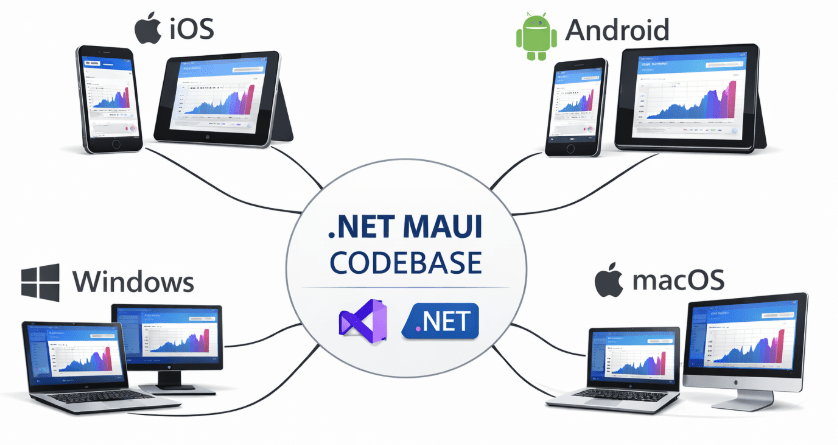
What is .NET MAUI?
.NET Multi-platform App UI (MAUI) is the evolution of Xamarin.Forms, designed to streamline mobile application development. It allows developers to write code once and deploy it across multiple operating systems. Here’s what sets it apart: Unlike some frameworks that use web views, .NET MAUI compiles native UI components, ensuring a high performance and authentic user experience on every device. This makes it an ideal choice for enterprise application development where performance and a native look and feel are critical.
For an app development company, this means faster project timelines, easier maintenance, and the ability to leverage a team of C# developers for projects that span from mobile to desktop. Whether you want to create a mobile app for internal use or a customer facing product, .NET MAUI provides the tools you need.
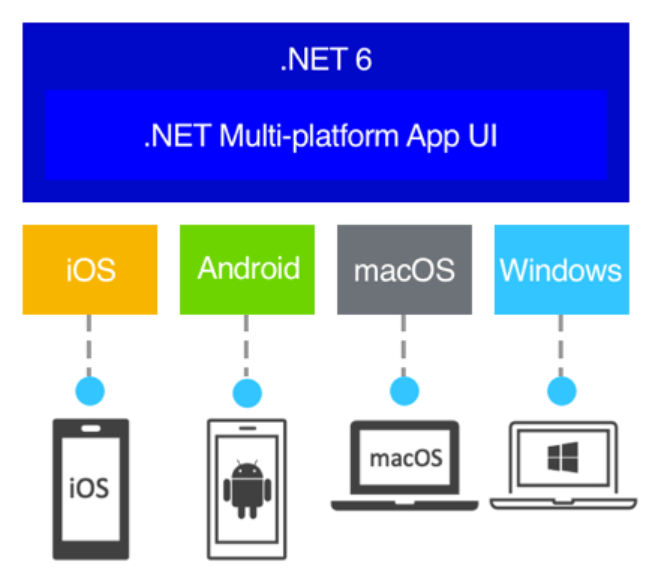
Key Benefits of Using .NET MAUI for Cross Platform Development
Choosing the right framework is a crucial decision in the application development lifecycle. Here are several reasons why .NET MAUI is an excellent option for your cross-platform app development needs.
- A Single Project for All Platforms
One of the most significant advantages of .NET MAUI is its single project structure. Developers can manage all platform specific assets, fonts, and code within one shared project. This simplifies the development workflow immensely compared to managing separate projects for Android app development and iOS development. This unified approach reduces complexity and makes the mobile app building process more organized and efficient.
2. True Native Performance
Performance isn’t just important it’s everything when it comes to user experience. .NET MAUI applications are compiled into native app packages. For Android, this means you get a package similar to one built with Android Studio. This direct compilation to native code ensures that your apps are fast, responsive, and can take full advantage of device hardware. For businesses, this translates to higher user satisfaction and engagement.
3. Access to Native APIs
A common concern with cross platform frameworks is limited access to native device features. .NET MAUI solves this with a cross-platform API that abstracts device functionalities like sensors, cameras, geolocation, and connectivity. This allows app developers to easily integrate platform specific features without writing extensive native code. When necessary, you can still access native APIs directly, offering the best of both worlds.
4. Code Sharing and Reusability
Here’s a number that will catch your attention: With .NET MAUI, you can share over 90% of your code, including UI and business logic, across all platforms. This massive code reusability accelerates the development process and simplifies maintenance. A bug fix or a new feature can be implemented once and rolled out everywhere simultaneously. This is a huge benefit for any mobile development company looking to optimize resources and deliver value faster.
The .NET MAUI Development Process
Getting started with .NET MAUI is straightforward for developers familiar with the .NET ecosystem. Here’s a high-level overview of the process of creating a mobile app.
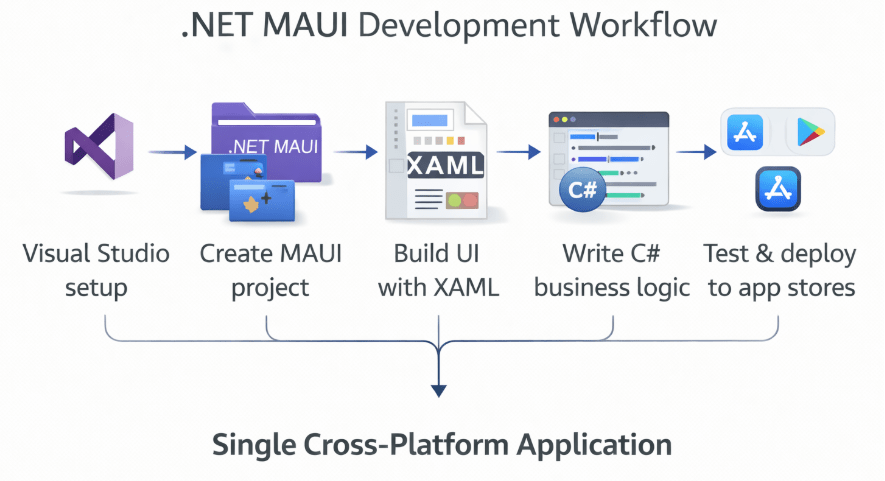
1. Setting Up Your Development Environment
To begin, you’ll need to install Visual Studio with the “.NET Multi-platform App UI development” workload. This package includes all the necessary templates, SDKs, and emulators to get you started. This setup provides a comprehensive IDE for writing, debugging, and deploying your applications, making it a powerful alternative for those accustomed to tools like Android Studio for android mobile application development.
2. Creating a New .NET MAUI Project
Once your environment is ready, you can create a new project using the .NET MAUI App template in Visual Studio. This template generates the single project structure containing folders for platform specific code, shared resources like images and fonts, and your shared C# and XAML files. This initial setup provides a solid foundation for your custom application development company to build upon.
3. Building the User Interface
You can define your UI using either XAML, a declarative markup language, or C#. XAML is often preferred for its readability and clear separation of UI from business logic. .NET MAUI provides a rich library of controls that map to native UI components on each platform. This ensures your app looks and feels right at home on any device. The real game changer? Hot Reload functionality allows you to see your UI changes in real time without recompiling the app, which drastically speeds up the UI development phase.
4. Implementing Business Logic
Your application’s business logic is written in C#. This is where you’ll handle data, user input, and interactions. Because the logic is in a shared codebase, you write it once, and it works everywhere. This is where the efficiency of .NET MAUI truly shines, especially compared to maintaining separate logic for Android and iOS. This unified logic approach is a core principle for any app dev company focused on efficiency.
5. Testing and Deployment
Testing can be performed on emulators, simulators, or physical devices directly from Visual Studio. You can debug your C# code on all target platforms, setting breakpoints and inspecting variables as you would in any other .NET application. When your app is ready, Visual Studio helps you package it for submission to the Google Play Store, Apple App Store, and Microsoft Store.
.NET MAUI vs. React Native
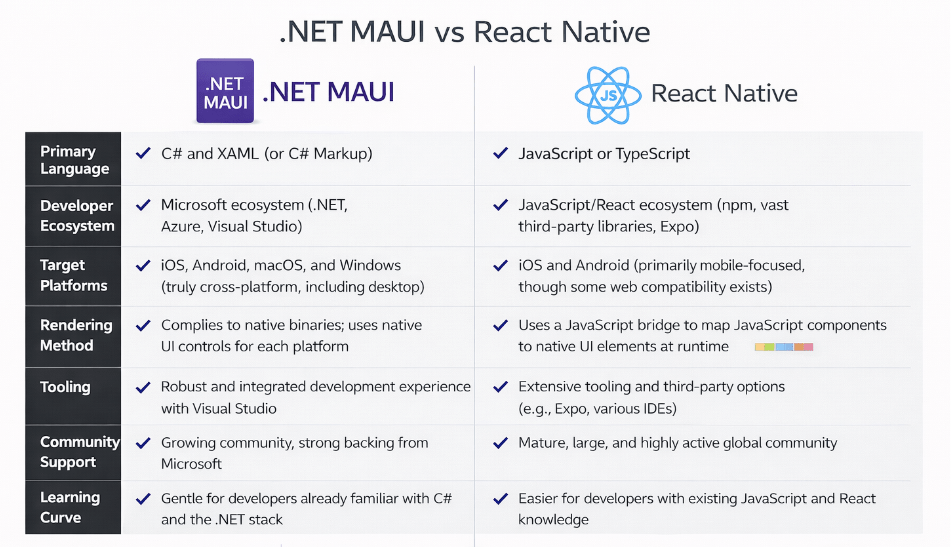
When discussing cross-platform app development, React Native is often part of the conversation. While both frameworks enable building apps from a single codebase, they have fundamental differences. A React Native app development company uses JavaScript and React, whereas .NET MAUI uses C# and .NET.
Here’s what you need to know: React Native uses a “bridge” to communicate with native components, which can sometimes introduce performance overhead. .NET MAUI, however, compiles directly to native UI, often resulting in better performance. For businesses already invested in the .NET stack, leveraging existing C# skills with .NET MAUI is a natural and cost-effective choice. While both have their merits, the deep integration with the .NET ecosystem makes MAUI a compelling option for enterprise application development.
Conclusion: Partner with the Right Development Company
.NET MAUI represents a significant step forward for mobile app development. It combines the productivity of cross-platform development with the performance and user experience of native applications. By enabling developers to build Android, iOS, Windows, and macOS from a single, shared codebase, it empowers businesses to reach a wider audience faster and more affordably.
Ready to bring your app vision to life? If you are considering your next mobile or web app development services project, exploring .NET MAUI is a wise move. To ensure success, partner with an experienced app development company that understands the nuances of the framework. A skilled team can help you navigate the complexities of application development and deliver a high-quality product that meets your business goals. Whether you need custom web app development services or a sophisticated mobile solution, the right partner like an android app development company or web app development company with .NET MAUI expertise can turn your vision into reality.

 Print on Demand Cloud
Leave a comment